Bridges
Doom 64's expanded action system allowed the creation of bridges, where players could go underneath and traverse across. These bridges are made with typical sectors, but the actions reconfigure the structure of the bridge when the view of the bridge is obscured. Then the 3D rendering features of Doom 64 futher allow geometry to render behind the bridge, visually completing the feature. The following sections describe the basic structure of Doom 64 styled bridges.
Sectors
Bridges have three sector types that each perform a different function.
- Path
- Railing
- Trim
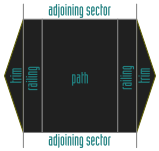
The path sector is the sector which the player uses to cross the bridge. Then the railing sector prevents the player from falling off the bridge (which can break the bridge's function). And finally the trim sector, trims the view of the bridge as viewed from a low angle. Then linedefs which comprise the bridge are flagged with the "No Occlusion" flag which allows geometry to render behind them. Either the sectors which comprise the bridge have the 666 special (instant kill) or its linedefs have monster blocking flags to prevent monsters from interfering with bridge operation.
Bridges are made around sectors which have sky or black ceilings. Otherwise when the bridge is in its lowered state, it can cause a hole to appear above the bridge.
Macros
Two macros are required to control the function of the bridge. One lowers the bridge, allowing the player to walk underneath it. And the other raises the bridge, allowing the player to walk across it. If this configuration change is done outside of the view of the player, then its change is mostly unnoticeable. Only the potentially crushed enemies or texture changes in the automap will hint at the change.
The bridge lowering macro operates with the following steps.
- Lower the path and railing floors to the lowest point so the player can go under the bridge.
- Lower the path, railing, and trim ceilings to generate the under-bridge view
- Swap the path and railing ceiling textures to a solid under-bridge texture.
Here the floors are lowered before the ceilings to reduce the potential of things being crushed. The ceilings are lowered before the sky texture is changed as this is less visually noticeable. However the order of these operations can be changed.
Then the bridge raising macro operates with the following steps.
- Swap the path and railing ceiling textures to a sky texture.
- Raise the path, railing, and trim ceilings to the sky.
- Raise the path and railing floors to form a railing and a transversable bridge.
The order here is in reverse of the lowering macro, although it doesn't need to be. This is also to prevent things from being crushed and to make the ceiling texture swap less noticeable.
The prior two macros are usually done in a section or behind a barrier which blocks the player's view of the bridge. Originally they are done with linedef crossings, but sometimes linedef crossings can be easy for the player to skip if they are running fast enough, thus triggers are often added to reinforce these linedef crossings.
Examples
For illustrative purposes, the following WADs shows the bridge section detached and attached from the adjoining structures.
Typically monsters are blocked from entering the bridge section, or the bridge section does not become active until monsters are killed. This is to prevent monsters from getting stuck upon the railing. By removing the railing side linedefs from the blockmap, monsters are able to navigate off of the railing. This allows monsters to transverse under the bridge safely as long as there is enough height above the bridge to fit their hitbox. Monsters can still be crushed where the top of the bridge connects to the adjoining sectors. So to create a monster safe bridge, linedefs can be set to block monsters at the entrance to the adjoining sectors. However allowing monsters to access this area is mostly safe unless the player happens to trigger the bridge at the right time. Below are example WADs of these to bridge types.
When removing the railing linedefs from the blockmap, the railings will need to be above 16 units thick to prevent the player from walking through them at high speeds.